


Creators & Entrepreneurs
How to Monetize YouTube: Why Memberships Outearn Ad Revenue
Here’s why memberships are the best way to monetize YouTube
Author
Mighty Team
Last Updated
May 12, 2026


Table of Contents
- Every way to make money on YouTube
- Why memberships are the best way to monetize YouTube
- YouTube ad revenue - The real numbers
- Revealing a REAL creator’s REAL earnings
- How to position your Channel for memberships
- How to launch a membership from YouTube
- Step 1: Find your idea
- Step 2: Define your Ideal Member (transition, not niche)
- Step 3: Plan their “Best Year Ever”
- Step 4: Set your price
- Step 5: Write your Big Purpose
- Step 6: Design a simple product
- Step 7: Choose your software
- Step 8: Recruit your founding 10 (not 1,000)
- Why YouTube + Mighty Networks is a power combo
- Conclusion
In this article
- Every way to make money on YouTube
- Why memberships are the best way to monetize YouTube
- YouTube ad revenue - The real numbers
- Revealing a REAL creator’s REAL earnings
- How to position your Channel for memberships
- How to launch a membership from YouTube
- Step 1: Find your idea
- Step 2: Define your Ideal Member (transition, not niche)
- Step 3: Plan their “Best Year Ever”
- Step 4: Set your price
- Step 5: Write your Big Purpose
- Step 6: Design a simple product
- Step 7: Choose your software
- Step 8: Recruit your founding 10 (not 1,000)
- Why YouTube + Mighty Networks is a power combo
- Conclusion
When we see top YouTubers like PewDiePie, Markiplier, and Like Nastya earning anywhere from $28 million to $38 million per year, it’s easy to fantasize about creating a YouTube channel. Plus, with YouTube earning over $28 billion in ad revenue last year, you can see why everyone wants a piece of that pie.
If you love being in front of the camera, have an interesting talent (like playing the ukulele while riding a unicycle), or simply want to vlog about your outfits, you’ve probably asked yourself, “What if I could do this on YouTube? And pay my bills!”
Then you learn the hard truth. YouTube pays about $0.00295 per view. Even a million views a month doesn’t necessarily mean a full-time income. And 1 million views is hard to get! Only a fraction of YouTube Channels see those numbers.
Reality hurts.
But there’s a fix. A business model that makes a YouTube income accessible. It’s by raising how much you earn per view. Not with YouTube’s built-in monetization. But through launching your own digital business from your YouTube following.
In this article, we’ll tell you why launching a membership off of your YouTube channel will change your revenue numbers. A successful membership can turn your views into a full-time income–without needing millions of eyeballs.
We’ll also tell you the hard truth about other monetization methods and getting paid on YouTube. And we’ll share some real numbers. We’ve pulled from Google data, creators who share publicly, and a new creator who recently monetized on YouTube who shared real numbers (and we got the receipts via screenshots!).
Try G2's #1 community platform -- home to more $1 million communities than any other.
Every way to make money on YouTube
We have a whole guide to making money on YouTube. So here’s a quick rundown of the ways you can earn, both on and off YouTube.
Here are the ways YouTube has built monetization into the platform.
Watch ads
YouTube Premium
Shorts Ads
Super Chats
Super Stickers
Super Thanks
Channel Memberships
Merch
How to diversify your YouTube income
But you’re not limited to the options built into YouTube. Here are the ways to monetize your YouTube following on a separate platform.
On a separate platform
Memberships & community: Charge a recurring membership fee for a dedicated community space where YouTube subs can connect to you and each other, host conversations, and create their own content.
Patreon & crowdfunding: Create a page to collect donations from supporters.
Courses: Teach what you know using a live or pre-recorded course.
Events: Host virtual or real-life events for subscribers.
Affiliates & Sponsorships: Sign up for affiliate programs or sponsorships and share links or placements in videos.
Products & Services: Create relevant offers and sell to your subscribers.
Brand partnerships: Connect with relevant brands to create branded content or promote their products or services.
Why memberships are the best way to monetize YouTube
The math most creators miss: 100 members at $48/mo = 1.6M monthly views in ad revenue
It starts with a number:
How much does YouTube pay per view?
YouTube pays about $0.00295 per view, $2.95 per 1,000 views, or $2,950 per million views.
We determined this number by aggregating the data from AdSense’s public numbers; these are the averages we get for every niche and geography. They also line up almost perfectly with our real creator’s numbers! (More on this later.)
That’s a depressing truth!
Most creators will never see 1 million views a month. If they do, it might take years to get there.
But there’s a simple way to change the math. Change your approach to monetization. Instead of expecting to earn a full-time living from YouTube ads alone, think like a business owner. Use YouTube as your acquisition channel–basically your free advertising machine–and build yourself a product off the back of it.
And one of the best digital products you can launch from a YouTube Channel is a paid membership. Not through YouTube itself (more on this in a minute), but on your own membership platform.
There’s one number you need to consider: $48. $48 is the average price of a monthly membership that people pay to belong in communities on Mighty Networks.
If you can get 100 members into a community at $48/mo, you’ve got a $4,800 monthly business. You’d need 1.6 million monthly views to earn this from ad revenue. Or, put differently, each paying member is the equivalent of 16,000 ad views in income, every month.
There are a few more benefits to offering a membership from your YouTube following:
Recurring revenue: Most memberships are monthly or yearly, meaning recurring payments. You don’t need to keep selling to members.
Scalable: A community isn’t strictly “passive income,” but there’s an outsized scalability you don’t get with other businesses. Moving a community from 100 to 1,000 members is 10x the income, but it’s not 10x the work.
Easy: With the help of an online community platform, you can easily build out an offer that looks great and serves members.
Here are a few examples of YouTubers building memberships:
Christine Byer burned out trying to keep the momentum going on YouTube for her videos on skincare and aging gracefully. She turned to a community and had a 5-figure launch in 2 weeks.
Mike Wendlend of RV Lifestyle built an online empire dedicated to RV-ing. And then turned a YouTube channel of +200k subscribers and 500k Facebook followers into a thriving online community that’s not algorithm dependent.
Tessa Romero founded Momset out of her YouTube and social media channels to help new moms master mindsets, and regularly sees $12,000 months.
Pay attention to how the top YouTubers win…
Mr Beast doesn’t just live off the ad revenue (although he makes enough that he could!). He launched products like Feastables, Beast Burger, or syndicated shows on other platforms (Beast Games). Alex Hormozi and Cody Sanchez use their massive followings to buy stakes in companies, boost their valuations, and increase the value of their shares.
The way to win on YouTube is to think differently. If you look at YouTube as the acquisition channel for your real business you own, you can win!
Why YouTube's built-in monetization caps your income (and a community doesn't)
YouTube memberships vs. a membership platform
At this point, we should talk about YouTube’s built-in membership feature. This option lets you turn on memberships and collect payments on youTube itself.
Channel memberships on YouTube have some pros:
They’re built-in and low maintenance. Many viewers have Google payments connected to their accounts already. It can be 1-click to join a channel membership.
You get buttons and badges built into YouTube, plus a members section. The “Join” button is also prominent.
YouTube offers premium member features like members-only videos or a members discussion forum.
But then there’s the cons about building directly on YouTube:
YouTube takes a 30% cut of all your membership revenue.
It’s really limited: you can’t sell courses, events, coaching, etc.
Engagement is brutal. Many channels with members see no difference in engagement, since the membership itself is dependent on the algorithm.
A membership fixes this.
Most membership platforms work on a fixed payment rate. For example, 100 members paying $10/mo on YouTube means you take home $600 (after YouTube’s $300 cut). On a membership platform that costs $78/mo, you take home $923 from that same membership. 1,000 members? You’re paying YouTube $3,000/mo! The membership platform stays the same cost.
Membership platforms are designed for engagement and discovery. They create focused attention around the thing you care about, and you can offer things like events, courses, live meetings, and more. Plus you can build your own brand.
Memberships get people off YouTube. You can stop fighting the algorithm and get your members in one place.
YouTube ad revenue - The real numbers
Let’s come back to the number we opened with. YouTube pays about $0.00295 per view. Let’s break this down:
How much does YouTube pay per 1,000 views?
Average of $2.95 per 1,000 views
How much does YouTube pay per million views?
$2,950 based on this metric.
We’ve seen some numbers out there that suggest creators earn $0.01 and $0.03 per view, but our data suggests that’s a bit on the high side. Remember, not every view gets counted as an ad view. And the average rates don’t support these numbers (check out the chart below).
Of course, it is possible. There's a HUGE discrepancy in what people get paid. Some YouTubers report earning as little as $.10 per 1,000 views and some can earn $20 per 1,000 views.
One new creator, Tatyana Savage, shows earnings of around $2.80/mille on a popular video.
Kevin - Financial Tutor earns $16.23/mille in the finance niche.
Some examples of what real creators on YouTube have earned:
Nano influencer Jen Lauren, who has 10,000 subscribers and vlogs on YouTube about everything from traveling, working in New York City, to trying a lymphatic drainage massage machine, earned $213 in a month.
YouTuber Sarah Lavender, who creates ASMR videos, has over 300,000 subscribers and earned $1,000 to $6,000/month.
The most popular YouTuber, MrBeast, makes anywhere between $3 to $5 million each month from a combination of ad revenue and paid sponsorships.

Revealing a REAL creator’s REAL earnings
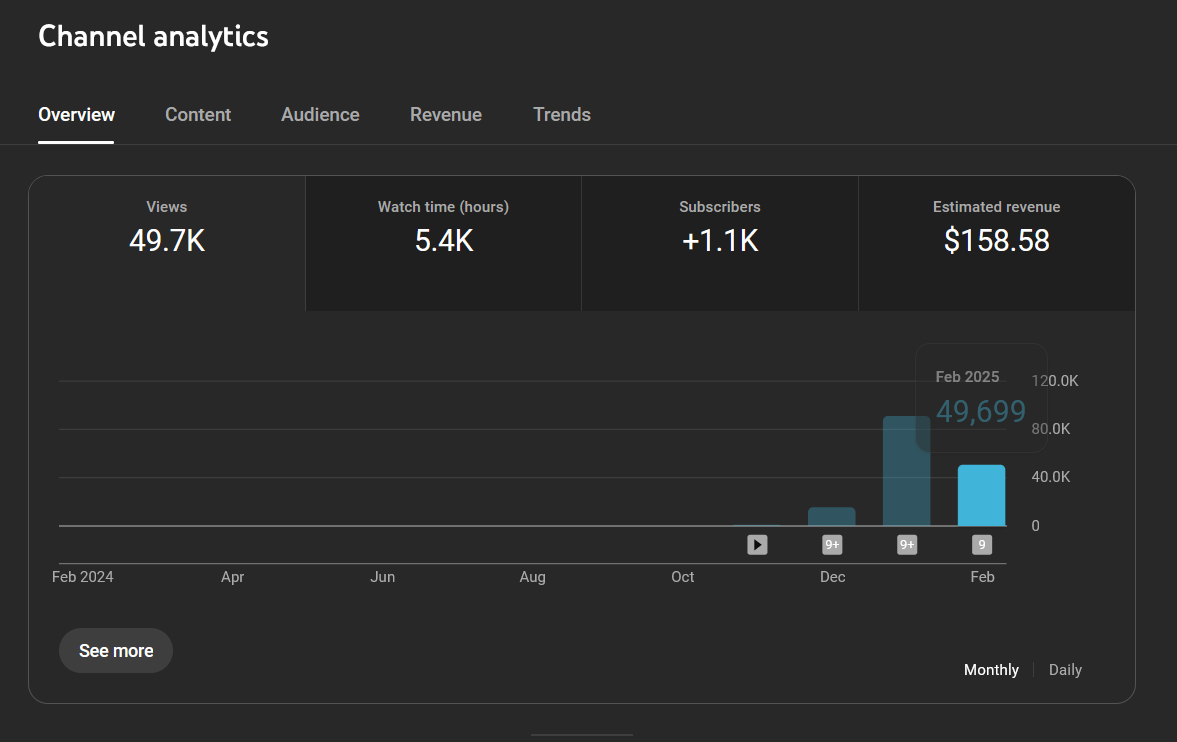
A creator who launched their YouTube Channel last year agreed to share their numbers with us. As you can see from the screenshot, January was a big month for this new creator–with several mini-viral videos! This helped them qualify for monetization.
This creator has the U.S. as their biggest market and the channel niche is Education.
February was the first fully monetized month–with fewer views.
According to this creator, they earned about $2.89 per thousand views from ads and YouTube Premium.
But they earned about $3.19 per thousand views once they added all revenue.
We’ll use this case study to break down how YouTube earnings work!
1. Total CPM

YouTube gives you this handy little number on your earnings dashboard. But this is NOT how much you get paid. This is how much YouTube charges advertisers to place ads in your content (cost-per-mille = CPM). The money you keep is the revenue-per-mille = RPM.
YouTube pays out 55% of its CPM to creators. So your RPM on YouTube is 55% of your CPM.
This number is also an average for the creator’s channel. Different videos will have different advertising values. Here’s a screenshot of this creator’s top videos. As you can see, each has a unique CPM.

But it’s more complicated than this…
2. Ads and YouTube Premium
The creator earned $143.83 from Watch Ads and YouTube Premium combined–a total of $2.89/1,000 views.

The two main ways creators get paid on watch time alone are YouTube Premium and Watch Page Ads.
This means:
If we count only ad views, the creator earned $2.20 per mille.
But once we factor YouTube Premium payments, the creator earned $2.89 per mille.
Does YouTube pay per view?
The short answer to this question is yes, YouTube pays per view. But not in the way you might think.
YouTube doesn’t pay creators per video view. YouTube pays creators per ad view on their channels.
Our creator found this out the hard way!
You will have thousands of views that are not qualified ad views (viewers must watch either a full 11-30 second ad or 30 seconds of a longer ad).
Since 61% of creators get paid through a revenue share of advertising, it's important to know this.
So when you estimate total ad revenue, some of the views won’t count.
Breaking down this creator’s numbers: So we know that YouTube charges advertisers $7.01 to post on this creator’s content. Take off 45% and you have $3.85, RPM, right? WRONG! Because not every view is monetized! The actual RPM for this creator was $2.89.
Here’s a math problem. What percentage of this creator’s views were actually monetized? We can figure this out with this equation: $2.89 (actual RPM) ÷ $3.86 (RPM if all views were monetized) = 0.749 = 74.9%
3. Supers and Memberships
The creator earned $14.00 from a $20.00 Super Thanks.

There are more ways to earn than just ads. YouTube has added modules that pay partners 70% of net revenues from: Memberships, Super Chat, Super Stickers, and Super Thanks.
Supers
A viewer paid this creator a $20.00 Super Thanks on a video. YouTube keeps 30%, giving the creator $14.00. This is basically a tip.
For many creators, ads are the smallest part of their earnings. Supers and Memberships are actually much bigger.
Super Chat - A message that is highlighted during a livestream.
Super Stickers - An animated sticker that is highlighted during a livestream.
Super Thanks - New feature! This lets any viewer give a tip on any video they are watching.
These features are cool! Because they help creators earn more from YouTube, even without a huge audience.
Super Chat and Super Stickers work during a livestream, because they help viewers get their questions and comments seen. For example, a popular creator might have a Q&A during or after a stream and prioritize answering the Super Chat questions. Viewers would pay to have their questions spotlit.
This is what Super Chats and Super Stickers look like during a livestream!

Channel Memberships

Channel Memberships are also built-in. We outlined above why these don’t work for most people.
Our creator hasn’t set up memberships yet, but is considering it–either with YouTube’s Memberships or through an external membership platform.
Here’s what it looks like to set up a membership offer.

4. Shorts
This creator earned $0.75 from shorts. But they admitted it’s not a huge part of their strategy right now.

Finally, shorts earn money through a percentage of a dedicated Shorts Monetization fund that pays out based on watch time. It actually works quite differently.
After all, you don’t show ads directly on your shorts.
Instead, YouTube collects all ad revenue from ads placed in the Shorts feed. They split 45% of this for creators, then distribute this among all monetized YouTube Shorts creators based on watch time. Our example creator made a few Shorts, but ultimately decided that monetizing long-form videos was a better fit for their brand.
How to position your Channel for memberships
1. Find your ideal member viewer
Before you start creating videos on YouTube, figure out who you’re making content for. An Ideal Viewer or Ideal Member (see below) is the person who needs what you have to offer.
If you want to grow and monetize your audience quickly, having a clear Ideal Viewer is the way to go. Start with a clear niche (e.g. travel, cooking, fitness, beauty, fashion, gaming) then go from there. Here are some questions to get you started:
Who are they?
What do they care about? What are their deepest desires?
What challenges do they face? What do they need help with?
What creators do they follow?
What part of your story will they be most impacted by?
And keep this question in the back of your mind — what would they pay to learn, access, or be part of? That's the transformation your Channel is really serving, and we'll come back to it.
2. Create quality content
No matter how insightful or interesting your videos are, if they’re poorly shot or edited, people won’t watch. Hook them in with good content, use a good camera, microphone, and lighting, and edit well so viewers stay captivated and subscribe to your channel.
But “quality content” means more than just the lighting of your videos. You’re setting an expectation for what people can expect in a membership.
Are your videos entertaining? Helpful? Thoughtful? Emotionally compelling? And–above all–do they serve a transformation of some sort? That’s what makes a Channel in service of a membership.
3. Create consistently
You might think that creating consistently means churning out as much content as you possibly can.
This, unfortunately, is actually a surefire path to creator burnout and more specifically YouTube burnout. It happens when creators feel pressured to consistently release new videos for their fans.
It can happen at any stage, whether a creator has thousands or millions of subscribers. When creators put their heart and soul into their work and don’t take care of themselves, it can lead to a slew of issues like feeling on edge, irritability, sadness, and tiredness.
To avoid this, first, consider ways to diversify your income off of YouTube as we mentioned above, and then pick a posting schedule that works for you. Once you feel comfortable with how often you’re posting videos, plan out your content. Choose not only the topic but a day you’re going to record and edit (especially if you’re not a pro at editing, this can take a serious chunk of time). You can even have a few videos ready to be released, creating a backlog for those times you’re too busy or sick to make a new video.
Here's the thing most creators miss. A membership is one of the best cures for YouTube burnout. When your income depends on weekly uploads, you can't slow down without taking a pay cut. When your income comes from recurring memberships, you can post when you have something worth saying, and your members are still there.
But we’ll get to that.
How to launch a membership from YouTube
A YouTuber has a huge advantage when launching a membership. You probably have an existing audience of people who trust you, and a “funnel” of content that could be leading them somewhere.
You’re already way ahead of the curve of digital creators! You don’t need 100,000 subscribers or a complex business plan. You just need an audience of people who trust you.
Even if you have 5,000 views a month. That’s enough to make it work.
Step 1: Find your idea
Every membership starts with a shared interest, obsession, or transformation. And to be honest, transformation is the superpower. It’s what people pay for.
If you have a YouTube Channel, you probably already have a rough idea of a niche and an idea of who you serve. Look at your top videos. Look at where people are engaging the most. What questions are people already asking?
That’s the foundation of your membership idea.
Don’t reinvent the wheel with your membership. Go deeper. Find a transition your YouTube Channel helps with, and build a membership to take people through it. That’s the play.
For example, if your YouTube is a travel vlog, the membership won’t be about “getting more travel tips.” It will be something like, “Helping solo female travelers see the world on a budget.” That’s a transformation (from dreamer to traveler) that someone will pay for!
Step 2: Define your Ideal Member (transition, not niche)
Great communities are not found in niches. They’re found in transitions. Taking people from point A to point B–especially when point B is somewhere they really want to be and can’t get to alone! That’s the membership vector.
Millennials starting their first reno business. Cake decorators wanting to earn a living. Sedentary office workers wanting to get active (in limited time).
These are transitions. You probably already have people in these transitions in your comments. What are they looking for? Get specific. (You can even run comments through AI to get some ideas!)
Step 3: Plan their “Best Year Ever”
Next, don’t worry about selling members features. Sell them a future! Where will they be in 12 months because they joined the community? Find that story and paint the picture.
When you have a YouTube audience, you have viewers who know you for something. They’re going to join your community because they believe you can help them get a transition. That’s it.
For example, what does a first-time novelist want a year from now? Pretty simple. They probably want a finished manuscript and perhaps a literary agent. That’s a transition. That’s a Best Year Ever!
Step 4: Set your price
Next up, what are you going to charge for this thing? There’s no perfect system for pricing (and everyone struggles with it). We said above that the average community on Mighty charges $48/mo. That can be a good benchmark.
A few things to think about:
What is the transformation worth? If they had to get it on their own, without your community, what would they pay?
Price high enough to encourage engagement. People don’t often value things they don’t pay enough for.
For YouTubers, you’re already providing a ton of free content and value. You don’t need a low-tier offer or free trial. You’re doing that with your Channel. Focus on the (smaller) group of members who will pay for more value.
Step 5: Write your Big Purpose
A Big Purpose is a single sentence that captures your community's reason for existing
Format it like this: “I bring together [ideal member] so we can [best year ever].”
It's both your pitch and your filter. People can use it to select in or out.
As a YouTuber, you can also use this as your CTA at the end of your video. It’s the perfect way to tell people about your community!
Step 6: Design a simple product
It’s counterintuitive. But the more you do, the less members engage. A community isn’t the place where you just add a bunch of additional content that you produce. It’s a party where you’re the Host!
Here are three layers of content:
Monthly themes create novelty and give lapsed members a reason to return; don't make them build on each other so new members can join anytime
Weekly recurring activities build habits. Pick a few activities (e.g. office hours, weekly challenges, book clubs) and run them same day/time for at least 4 weeks.
Daily polls and questions drive engagement with unlocking phrases (“What's one…,” “Name an unusual…”)
YouTubers can also do Channel-related value adds: for example, members-only Q&A streams, a monthly behind-the-scenes drop, or a weekly thread. Resist the urge to just make extra YouTube content for your community.
Step 7: Choose your software
Next, you need software to run this membership. You need one piece of software, not 10. Avoid stitching together Patreon + Discord + Stripe, and so on. This adds more friction and hurts engagement.
The best place to host a membership is on a dedicated community platform. It should be built to do all you need to do, connect members together, collect money, and deliver amazing experiences.
Again, YouTube Channel Memberships isn't the right choice here. It takes a 30% cut, which will be a serious drag on your revenue. And Patreon is a tip jar, not a community platform.
There’s software built for this. It will make your life way easier.
And if you want to try G2’s #1 community management software, you can try it free here for 14 days.
Step 8: Recruit your founding 10 (not 1,000)
When you launch a community, you don’t need 1,000 people on day 1. In fact, it’s better to start small. Start with 10. 10 founding members, who can give you direct feedback and sow the seeds for your community.
You can grow from here.
Here are a few ideas to get your first 10:
Invite applicants from your channel (but don’t just let everyone in by default).
Comment below really engaged commenters and let them know you’re launching.
Create a specific video outlining your vision on YouTube.
Reach out to your mailing list (if you have one).
Once your founding 10 are in and the community is alive, then open it up to your wider audience
Why YouTube + Mighty Networks is a power combo
If you want a dedicated community platform that’s ranked #1 by G2, try Mighty Networks. While you grow on YouTube, Mighty offers a way better alternative to either built-in YouTube monetization or to the common third-party tools like Patreon.
Here’s what you can do with Mighty:
Members can actually engage, whether it’s building profiles, creating content, or meeting each other. This creates a network effect, meaning your community becomes more valuable with each person that joins.
You get real monetization freedom. For Mighty’s flat fee you can sell communities, memberships, livestreams, premium content, courses, events, and more. Plus, you can mix and match or bundle any of these.
Build under your brand. Whether it’s branding your community, hosting on your own URL, or even offering a totally branded app, you can make your membership your own.
Thrive with software designed to create people magic with AI engagement tools, conversation starters, icebreakers, gamification, unlocks, and challenges.
YouTube lets you build an audience. Mighty gives you the tools to build a real business around that audience.
Conclusion
Making money from YouTube views is both an exciting opportunity and a strategic challenge. While the platform provides various revenue streams—from ad earnings and YouTube Premium to Super Chats, memberships, and sponsorships—success doesn’t happen overnight. Factors like your niche, audience engagement, video length, and even the time of year can significantly impact earnings.
Here's the truth most YouTubers learn the hard way: ad revenue alone is unlikely to replace your day job. The math doesn't work for most creators, and even when it does, you're still at the mercy of the algorithm.
The smarter play is to treat YouTube as your acquisition channel and build a real business off the back of it. And a paid membership is the fastest, most scalable way to do that. 100 members at $48/month is more reliable income than 1.6 million monthly views, and it's a goal almost any committed creator can hit.
FAQs
If I move my audience into a paid community, will that hurt channel growth or actually improve RPM through higher watch-time?
It depends on your goals and where you spend your time. For example, if your goal is making money and launching a business from your YouTube following, you may reach that faster with a dedicated community. Since you have more ways to earn and an engaged audience, communities usually outearn a channel alone.
The average community on Mighty charges $48/mo for membership; you’d need a lot of YouTube views to earn that much in ad revenue.
If your goal is a huge subscriber base or a certain vanity metric, then devoting some of your time to growing and nurturing a community behind a paywall might detract from that goal.
It’s all about knowing what you want and finding the strategy to help you get there!
How many YouTube subscribers do I need before launching a membership?
Fewer than you'd think. The conventional wisdom says you need to wait until you've hit 1,000 subscribers (the YouTube Partner Program threshold) or some big round number like 10,000 before you can monetize.
That's true for ad revenue. It's not true for memberships.
For a membership, the right metric isn't subscriber count; it’s engagement. If you have around 5,000 monthly views and a comments section where people are showing up consistently, asking questions, and engaging with each other, you have enough to launch.
What’s the difference between video views and ad views
Video views: The amount of views your video gets. Repeat views (someone watching multiple times) on YouTube can count towards total views. (But YouTube can detect people manipulating with inflated repeat views.)
Ad views: The number of times ads are shown to viewers of your video. You only get paid with Adsense when people see ads.
That’s because getting revenue from your YouTube channel doesn’t just magically happen, you’ve got to set things up first!
How do I calculate CPM or RPM?
What It Is | Acronym | Formula | |
|---|---|---|---|
Cost per mille | The amount advertisers pay YouTube per 1,000 views | CPM | CPM = (Total Ad Revenue / Number of Ad Impressions) × 1,000 |
Revenue per mille | The amount you earn per 1,000 views | RPM | RPM = (Total Revenue Earned / Number of Video Views) × 1,000 |
How do YouTube’s revenue share models work?
Something else that will affect your earnings is your revenue share by category.
Commerce Product Module pays partners 70% of net revenues from channel memberships, Super Chat, Super Stickers, and Super Thanks.
Watch Page Monetization Module pays partners 55% of net revenues from ads displayed or streamed on their public videos on their content Watch Page. It also applies when public videos are streamed within the YouTube Video Player on other websites or apps.
Shorts Monetization Module pays partners 45% of the revenue allocated to them based on their share of views from the Creator Pool allocation.
How can I boost my RPM?
Dial in your audience. Building a consistent, predictable audience who trust you improves your appeal to advertisers.
Increase your quality. The higher quality your content is, the more advertisers may be willing to pay, and the better ads you can attract.
Turn on your data sharing. YouTube has a simple switch you can turn on that shares your channel data with potential advertisers–this could create better alignment and bring higher paying advertisers to your channel.
Choose your niche carefully. Definitely create what you love. But if you happen to love creating in the Finance or Electronics niche (the highest paid from our chart above), that might boost your revenue.
Turn on mid-roll ads. The easiest way to boost RPM is to turn on “midroll” ads– this serves additional ads in the middle of longer content.
Promote your other streams. Reminding people and giving opportunities to participate in memberships or superchats can boost your overall RPM.
What impacts your ad revenue?
Let's be clear. YouTube monetization is a bit of a black box, and we need to peek under the hood to see what creators are really making. But these are always estimates. There are a ton of variables for each creator, and that's not counting those who make money off-of YouTube (e.g. earning in other ways from a YouTube channel).
The amount that YouTubers earn is based on a whole bunch of factors, including:
1. Location & niche: Different parts of the world have different payout rates for ads. Plus, there's a huge variance in payouts based on your channel's niche.
2. RPM shift: The RPM for any niche fluctuates throughout the year. For example, seasonality is huge! This is the demand for advertising at different times of the year.
3. Ad blockers: Ad blockers can mess with your numbers even more. Not only do you lose ad revenue when people use blockers, it also messes with your analytics. You might see higher view counts, but lower ad revenue.
4. YouTube Premium: With Premium, a portion of subscription revenues goes in a pool that’s used to pay out creators, you don’t get direct ad revenue.
5. Watch-through rate: Not every view counts. For ads that are 11-30 seconds long, viewers must watch the whole thing. Otherwise, viewers must watch at least 30 seconds for it to count. OR if a user clicks on a button on the ad it also counts as an engagement.
6. Video length: Longer views have more content, and that’s more opportunity to generate ad revenue.You can turn on mid-roll ads, to create more ad revenue during a long video. Videos must be more than 8 minutes for mid-roll ads.
7. Video quality: Even video quality can impact ad revenue! Some advertisers prefer high-quality videos.
8. Ad type: Ad revenue also varies by ad type, which Google lays out here. We’ve included this chart for a quick reference. Remember, the more lucrative these ads are, the more annoying they may be for viewers.
9. Engagement rate: Engagement rate is basically how much people engage with your videos. For example, if 10,000 people watch your video, and it gets 350 likes, 100 comments, and 40 shares, it has an 4.9% engagement rate (350 + 100 + 40)/10,000 x 100 = 4.9%. You don't get paid directly for engagement rates. But videos with a high engagement rate are more likely to get suggested to other viewers.
How does YouTube’s monetization compare to other platforms like TikTok or Instagram?
We have a guide to making money on TikTok as well as making money on Instagram. All platforms can be monetized. But TikTok has almost no native monetization features. Instagram has some great monetization options: like subscriptions, ads, and shopping. But YouTube probably edges them both out when it comes to the sheer options for monetization and how well it fits into the platform.
What are the tax implications of earning money on YouTube?
Anything you earn on YouTube is taxable. Make sure to check the rules for your local tax jurisdiction to make sure you’re in compliance. Google Adsense will probably also prompt you to submit relevant tax forms.
Can YouTubers earn money from embedded videos on other websites?
Yes, you can still earn ad revenue when advertised content plays on another site. And that embed can signal to YouTube that a video is valuable–potentially increasing its standing in YouTube search.
How does YouTube handle revenue sharing for collaboration videos with multiple creators?
Ad revenue doesn’t clearly work between creators. Whoever uploads the video gets the revenue. Worse still, uploading duplicate videos on different channels may earn penalties.
Are there specific industries or niches that have stricter ad restrictions on YouTube?
Yes. There are much stricter ad restrictions for gambling, alcohol and tobacco, prescription drugs, financial services, and adult or sexual content. If your content fits within one of these niches, you may have a more difficult time getting and staying monetized. You may also have lower CPM rates, if advertisers aren’t as interested in working with your content.
What happens to YouTube earnings if a video gets age-restricted or limited ads?
Age-restricted content gets anywhere from 70-90%lower ad revenue. This is content that is rated for 18+ and requires a viewer to be logged in to watch. This could be sexual content, violent or disturbing content, or controversial political content. And this kind of content scares off advertisers.
Does posting YouTube Shorts earn the same RPM as long-form videos?
No, Shorts work differently. Because there’s not an ad before every single Short, you don’t earn ad revenue per-play. Instead, YouTube creates a pot of all the ad revenue from ad-sponsored shorts and divides this pie among creators by country plays.
Here’s how it works:
YouTube pools the earnings from Shorts revenue.
The pool is split–45% for creators and 55% for YouTube.
Your share of the pie is based on your views as a percentage of all the Shorts views in your region.
Shorts often earn less money than long-form content, but can be a good way to reach new audiences.
Which niches historically have the highest CPM—finance, tech, or gaming?
As the chart above shows, finance and electronics have the highest RPM. Gaming is much lower.
What is the best content for YouTube to earn money?
You might be surprised at the answer. The best content for YouTube to earn money is the content you love creating, that you can create for a while. If you aren’t interested in finance, choosing finance as a niche for the “high RPM” isn’t a great strategy. It takes time and effort to earn money on YouTube, years for most creators. You’re more likely to go the distance and earn money by choosing a topic you love to create around rather than chasing the highest RPM niche.
What happens to RPM when I enable non-skippable ads or extra mid-rolls—does it always go up?
It’s not that simple. Technically these measures could boost income per video–and your RPM. But more ads increases the chance that people will click away or lose interest. This drives down your retention, making for lower watch time. And lower retention means the algorithm won’t suggest the video as much.
Every creator has to balance. And for many creators, increasing ads and potentially turning off viewers just isn’t worth it. You need to weigh the pros and cons for your channel.
Can brand-safe language and closed captions improve my CPM?
In short, yes! Here’s how.
Brand safe language means your channel is suitable for most viewers, with minimal profanity, violence, or controversial topics. It also means you’re not discussing controversial or sensitive subjects. The result is pretty simple–more advertisers may want to work with your channel. This can boost CPM.
Closed can improve CPM in a different way. They allow for more viewers of your content, boosting accessibility for viewers who can’t listen. YouTube also offers dubbing in other languages, which also boosts the pool of people who can watch your video.
Is there a reliable way to predict next month’s earnings using YouTube Analytics data?
It’s not guaranteed, but if you A. Know how many videos you will produce, B. Know the average views per video, and C. Know your RPM, you can get a ballpark of what next month’s earnings could be. But this doesn’t account for breakout viral hits (yay!) or the potential that some videos fall flat or hit seasonal dips.
A few more wild card factors:
A changing algorithm: YouTube can make adjustments that can boost or tank your reach.
Shorts vs. long-form mix: The formats can change your RPM, as can the length (ie. Do you have multiple mid-rolls?)
CPM seasonality: CPM notoriously changes at different times of the year. Oct - Dec is usually the highest ad-spend season leading up to the holidays.
Different topics: If your channel varies in topics, you will see a wide variation in your RPMs.
Audience growth and catalogue views: Hopefully your audience grows each month with new subscribers and more people going to your back catalogue to watch your greatest hits!
Ready to start building your community?
Start a free 14-day trial to explore Mighty—no credit card required.
More like this


Join Mighty Community
Learn the principles of Community Design™ (and see them in action) alongside thousands of creators and entrepreneurs. It's free to join!


Online Courses
Creating a Course
Teaching a Course
Course Platforms
Selling a Course
Communities & Memberships
Community Platforms
Managing a Community
Building a Community
Growing a Community
Monetizing a Community
Creators & Entrepreneurs
Monetization
Content Creation
Starting a Business
Website Builders
Creating & Managing a Website
Events
Event Platforms
Hosting & Marketing Events
Branded Apps
Creating a Mobile App
Coaching Apps
Community Apps
Coaching
Mastermind Groups
Starting a Coaching Business
Coaching Platforms
Filter by Category
Online Courses
Communities & Memberships
Creators & Entrepreneurs
Events
Branded Apps
Coaching
Start your free trial
14 Days. No Credit Card Required.